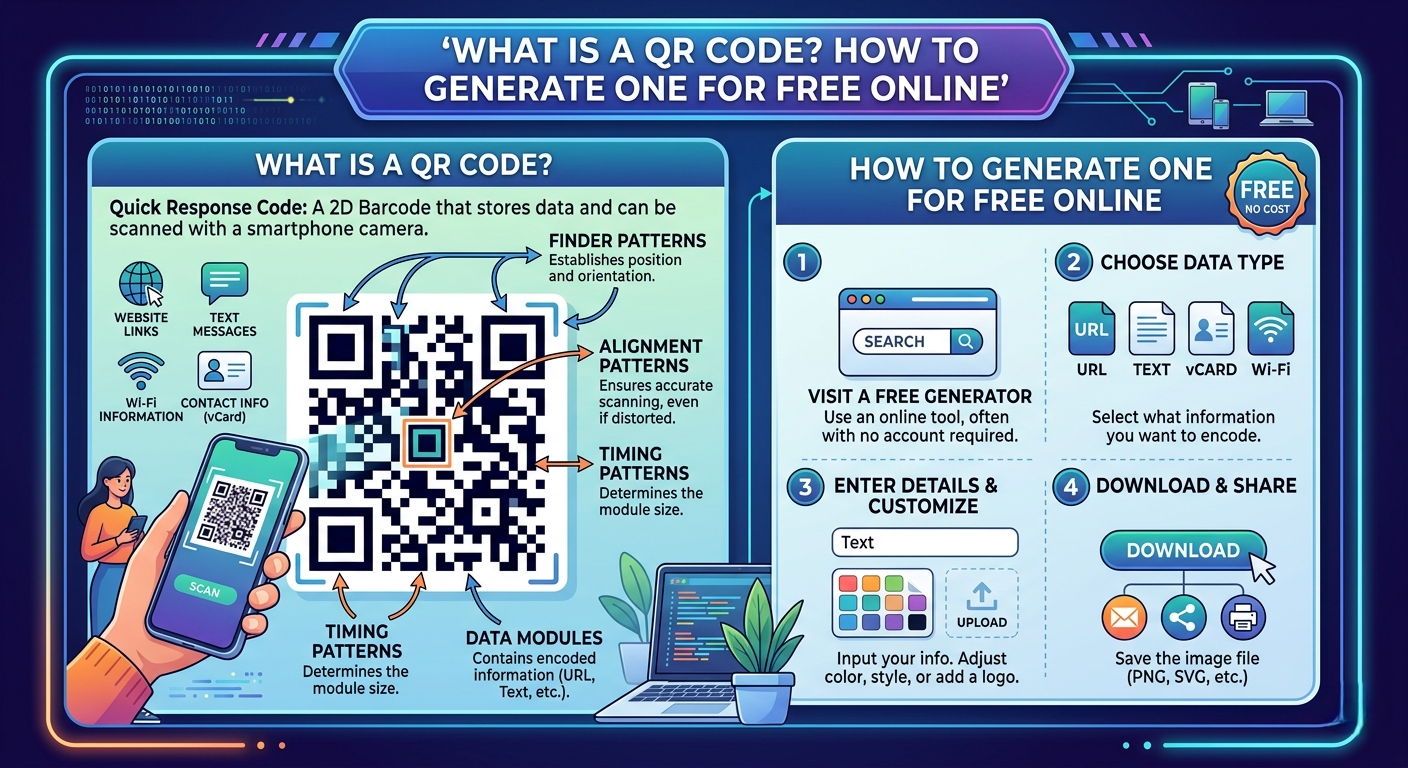
What Is a QR Code? How to Generate One for Free Online
Learn what QR codes are, how they work, and how to generate a free QR code online in seconds. Perfect for businesses, restaurants, events, and personal use — no app needed.
QR codes are everywhere. You see them on restaurant menus, product packaging, business cards, event tickets, and storefront windows. But what exactly is a QR code, how does it work, and how can you create one for free? This complete guide answers all your questions.
What Is a QR Code?
QR stands for "Quick Response." A QR code is a two-dimensional barcode that can store a variety of information types, including URLs, text, contact details, Wi-Fi credentials, payment information, and more. QR codes were invented in 1994 by Denso Wave, originally for tracking vehicles during manufacturing.
How Do QR Codes Work?
When you scan a QR code with your smartphone camera, the device reads the pattern of black and white squares and decodes the information. QR codes contain three key elements: position detection patterns (the three large squares), data modules (black and white squares), and error correction (readable even if up to 30% is damaged).
Types of QR Codes
- Static QR Codes: Data is permanently encoded. Free to create. Ideal for personal use or permanent information.
- Dynamic QR Codes: Contain a short URL that redirects. Destination can be changed anytime. Provides scan analytics for businesses.
What Can a QR Code Contain?
Website URL, plain text, email address, phone number, Wi-Fi credentials, vCard (contact information), SMS, Google Maps location.
How to Generate a Free QR Code Online
Step 1: Go to a free QR code generator (like Toolrivo). No login required.
Step 2: Enter your content — URL, text, phone number, etc.
Step 3: Click "Generate" — your QR code is created instantly.
Step 4: Download as PNG or SVG. For print materials, use high-resolution PNG (at least 1000x1000 pixels).
Step 5: Test with at least two different devices before publishing.
Practical Uses of QR Codes
For Businesses: Link product packaging to instruction videos, restaurant menus, business cards, app downloads, payment platforms.
For Events: Event schedules, digital tickets, feedback surveys.
For Personal Use: Share Wi-Fi password, personal website, social media profiles, location for meetups.
For Education: Link physical materials to supplementary digital content, videos, or interactive exercises.
QR Code Best Practices
Size matters: minimum 2x2 cm for smartphone scanning. Contrast is essential: dark code on light background. Test in real conditions. Add a call to action near your QR code (e.g., "Scan to see our menu").
Conclusion: QR codes are a simple, powerful, and free way to connect the physical and digital worlds. Generate your free QR code now at Toolrivo — no account needed, unlimited QR codes, instant download.