DNS Lookup Explained: How to Check DNS Records Online for Free
Learn what DNS lookup is, how DNS records work (A, MX, CNAME, TXT), and how to check any domain's DNS records for free online. Essential for developers and website owners.
Every time you type a web address into your browser, a complex process called DNS resolution takes place behind the scenes — converting the human-readable domain name into a machine-readable IP address that computers use to communicate. Understanding DNS (Domain Name System) is essential for developers, system administrators, and anyone who manages a website.
In this guide, we'll explain how DNS works, what the most important DNS record types mean, and how to check DNS records for any domain using a free online tool.
What Is DNS and Why Does It Matter?
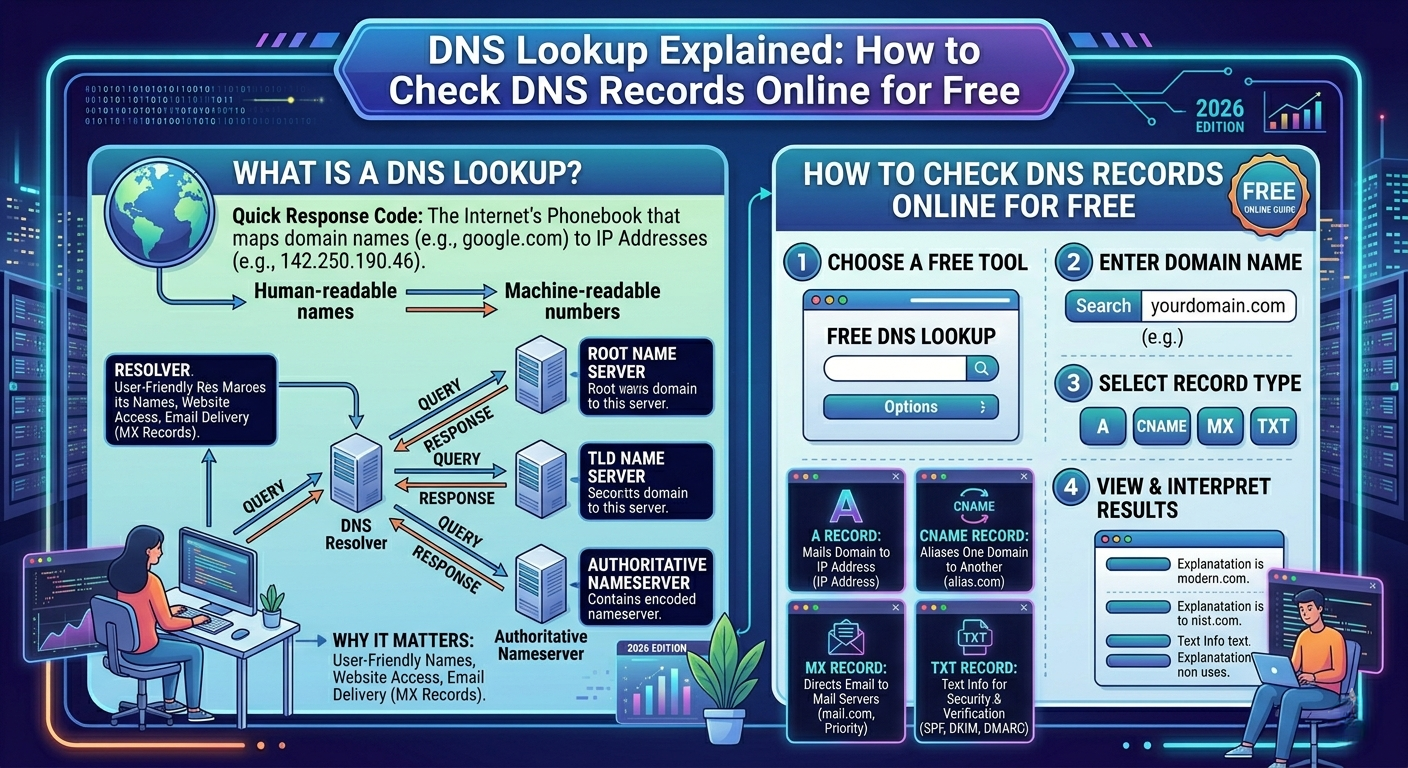
DNS stands for Domain Name System. Think of it as the internet's phone book. Just as a phone book converts a person's name into their phone number, DNS converts a domain name (like "toolrivo.com") into an IP address (like "192.168.1.1"). Without DNS, you would need to remember the exact IP address of every website.
How DNS Resolution Works: Step by Step
- Your browser checks its local cache.
- If not cached, your browser asks your operating system's DNS resolver (usually your ISP's DNS server).
- The DNS resolver queries a root name server, which directs it to the appropriate TLD server (e.g., .com server).
- The TLD server directs the resolver to the authoritative name server for the specific domain.
- The authoritative name server returns the IP address.
- Your browser connects to that IP address and loads the website.
This entire process typically completes in 20 to 120 milliseconds.
Types of DNS Records Explained
- A Record: Maps a domain name to its IPv4 address.
- AAAA Record: Maps a domain name to its IPv6 address.
- CNAME Record: Creates an alias pointing one domain name to another (e.g., www to root domain).
- MX Record: Specifies which mail servers handle email for a domain.
- TXT Record: Stores text information for domain verification, SPF, DKIM.
- NS Record: Identifies which DNS servers are authoritative for a domain.
- SOA Record: Contains administrative information about the DNS zone.
- TTL (Time to Live): Number of seconds a DNS record is cached before refresh.
Common DNS Issues and How to Diagnose Them
DNS Propagation Delays: Changes can take from minutes to 48 hours. Use a DNS lookup tool to check propagation status.
Email Delivery Problems: Often caused by incorrect MX records. Use an MX lookup tool to verify configuration.
Website Not Loading After Domain Transfer: Check NS records to confirm they point to your new name servers.
SSL Certificate Errors: Some issuers require specific TXT or CNAME records for domain validation.
How to Check DNS Records for Free
Step 1: Go to Toolrivo's DNS Lookup tool.
Step 2: Enter the domain name you want to check (e.g., example.com).
Step 3: Select the record type (A, MX, CNAME, TXT, NS, or All).
Step 4: Click "Lookup" — results appear instantly, showing all DNS records of the selected type.
DNS Best Practices for Website Owners
Keep TTL values appropriate (3600 seconds / 1 hour standard). Before planned DNS changes, lower TTL to 300 seconds 24 hours in advance. Configure SPF and DKIM records to authenticate outgoing email. Use redundant MX records for failover. Monitor your DNS regularly for unexpected changes.
Conclusion: DNS is the invisible backbone of the internet. Understanding DNS records and being able to check them with a free online tool is an invaluable skill. Use Toolrivo's free DNS Lookup tool to instantly check any domain's DNS records — no login required, results in seconds.